Interested in expanding your NEMT business to serve veterans? With Veterans Day this week, here’s a practical guide to finding opportunities with the Department of Veterans Affairs (VA) on SAM.gov, understanding what you find, and deciding what to do next.
What is SAM.gov?
SAM.gov (opens in a new tab) is the federal government’s platform for registering businesses and posting contract opportunities. You can browse its Contract Opportunities (opens in a new tab) before registering to see whether any match your services.
1. Understand the types of opportunities on SAM.gov
Before searching, it helps to understand what you’re looking at. Not every notice is an invitation to bid. Some ask businesses to share their capabilities, while others announce changes or identify who won a contract.
Here are two types to recognize.
Solicitations: Bid to work
A solicitation formally asks businesses to submit an offer, quote, or proposal. It explains the work, how the VA will evaluate responses, and how to submit yours.
Before preparing a bid, confirm that your business meets the eligibility requirements and can provide the required vehicles, staffing, service area, and operating hours.
For example, the Central Alabama VA Health Care System solicitation (opens in a new tab) asks bidders to provide:
- A pricing schedule.
- Insurance documentation.
- Relevant ambulance contract experience, including the requested details and references.
- Additional certifications.
Use the solicitation’s instructions to build a checklist for future bids, as each opportunity may request different documents.
Sources Sought: Show the VA what you can cover
A Sources Sought notice helps the VA identify businesses that could perform potential work before it decides how to purchase the service. Your response introduces your business and describes what you can provide. It is not a bid or a contract.
For example, Wilmington VA Medical Center issued a Sources Sought notice for ambulance and wheelchair van transportation (opens in a new tab) across specified locations in Delaware, Pennsylvania, and New Jersey.
The notice closed on February 20, 2026, but it gives you an idea of what similar notices may request:
- A capabilities statement.
- Your company’s SAM Unique Entity ID (UEI) and business address.
- Your socioeconomic status.
- Information about Veteran-Owned Small Business (VOSB) or Service-Disabled Veteran-Owned Small Business (SDVOSB) status.
- Confirmation that your business could handle pickups and drop-offs at all required locations.
When responding, be specific about your service area, trip types, and operating hours. This helps the VA understand where your business fits.
2. Understand the terms to search
Now that you know the types of opportunities available, how do you find the ones that match your business?
Start with industry terms and NAICS codes.
Industry terms
Not every VA transportation notice uses the term NEMT. Buyers may describe the work as:
- Wheelchair van transportation
- Non-emergent ambulance transport
- Patient transportation
- Ambulatory transportation
- Rideshare
Start with one of these terms and filter for the Department of Veterans Affairs. As you review the results, keep track of other terms buyers use to describe your services. Those terms can help you refine your next search.
NAICS codes
You can also search by NAICS code. NAICS stands for North American Industry Classification System. Federal buyers use these codes to classify the work they purchase.
Here are some codes to explore based on the services you provide:
| NAICS code | Category | When to search it |
|---|---|---|
| 485310 | Taxi and Ridesharing Services | You operate a taxi or rideshare business and want to find related transportation work. |
| 485991 | Special Needs Transportation | You provide specialized passenger transportation, including wheelchair van service. |
| 621910 | Ambulance Services | You provide ambulance transportation or want to identify requirements that may also include wheelchair van service. |
Use the Census Bureau’s NAICS lookup (opens in a new tab) to review the definitions and identify additional codes that match your services.
For examples of notices listed under NAICS code 621910, see:
- Central Alabama VA Health Care System Emergent & Non-Emergent Ambulance Services (opens in a new tab)
- Non-Emergent Ambulance Transport Services for Fayetteville VAMC (opens in a new tab)
Read the full scope even when the title sounds relevant. A notice may combine several transportation services, and your business may cover only part of the requirement.
3. Learn how to read an opportunity
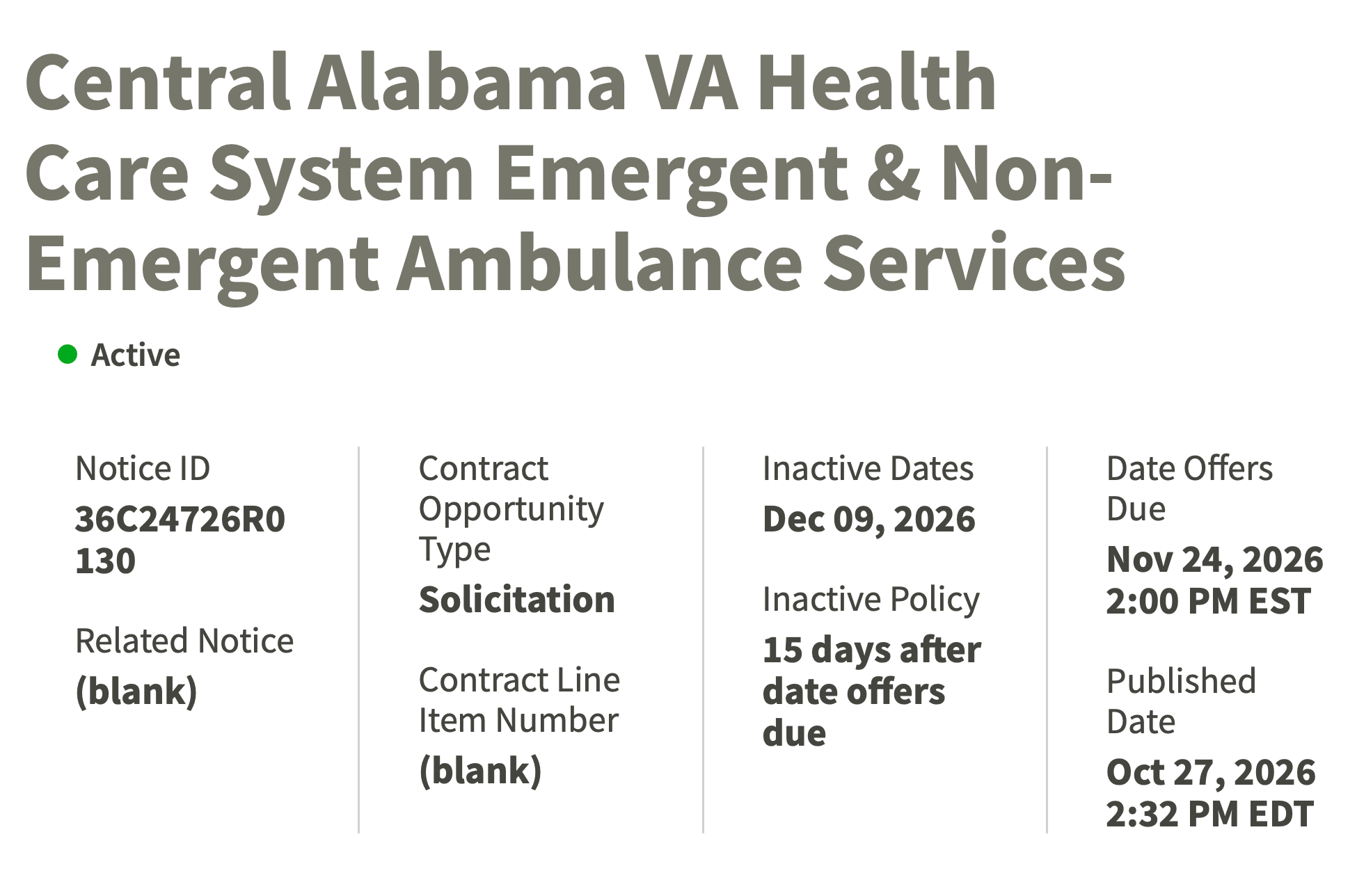
Contract opportunity
 (opens full size in a new tab)
You’ve found an opportunity that looks promising. Now, how do you decide whether it’s a fit?
Start with the information in the notice:
- Notice ID: The reference number used to identify the opportunity. Save it so you can find the notice again and reference it in correspondence.
- Contract opportunity type: Whether the notice is a Solicitation, Sources Sought, Award Notice, or another type.
- Deadline: The response date and time zone. Deadlines can change for a number of reasons. Changes are typically issued as an amendment to the notice, so check for amendments before you submit.
- Place of performance: Where you’ll need to provide services.
- NAICS code: The industry classification assigned to the work.
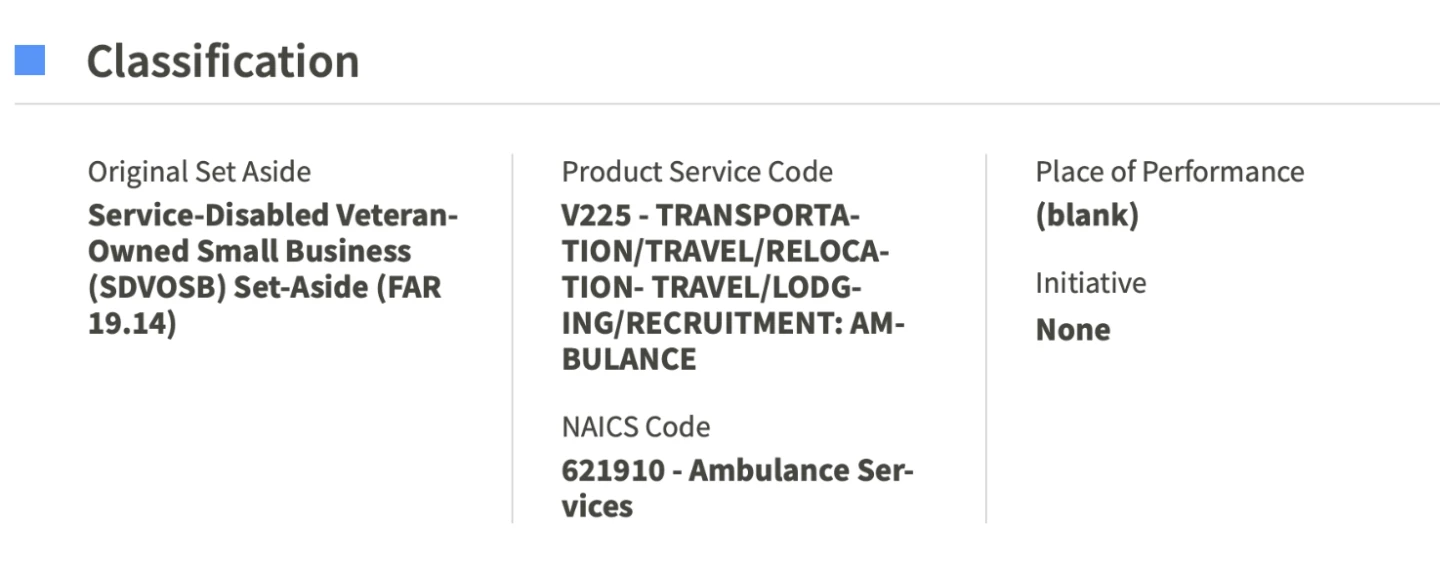
- Set-aside: Whether competition is limited to a particular category of eligible businesses.
- Description: An overview of the requested services. It may direct you to attached documents for the full scope.
- Point of contact: The person or people handling the opportunity.
- Attachments and links: Where you’ll find the scope, submission instructions, evaluation criteria, amendments, wage determinations, and other requirements.
The solicitation itself is often attached as a PDF labeled with the solicitation number. Read the attachments before deciding to bid. The notice summary alone may not give you the full picture.
What does “set-aside” mean?
Classification
 (opens full size in a new tab)
A set-aside reserves all or part of a procurement for eligible small businesses. Some limit competition to a specific category, such as Service-Disabled Veteran-Owned Small Businesses (SDVOSB).
If a notice says 100% SDVOSB set-aside, only eligible SDVOSBs can compete for that award.
To compete for SDVOSB set-asides, your business must be certified by the SBA.
- Review the SBA’s Veteran Small Business Certification program (opens in a new tab), also called VetCert, to get started. It certifies eligible Veteran-Owned Small Businesses and Service-Disabled Veteran-Owned Small Businesses for qualifying contracting opportunities.
- Check the SBA’s eligibility and application guidance. Eligibility generally requires at least 51% veteran ownership and control, along with other requirements. SDVOSB certification also requires qualifying service-disabled veteran ownership and control.
- Apply through MySBA Certifications (opens in a new tab).
- Once approved, confirm that your business appears in the SBA certification search (opens in a new tab) and keep your information current.
If you also pursue state, county, or municipal work, check those buyers’ certification requirements, as they may be less stringent.
4. Find out who won the contract
Award notice
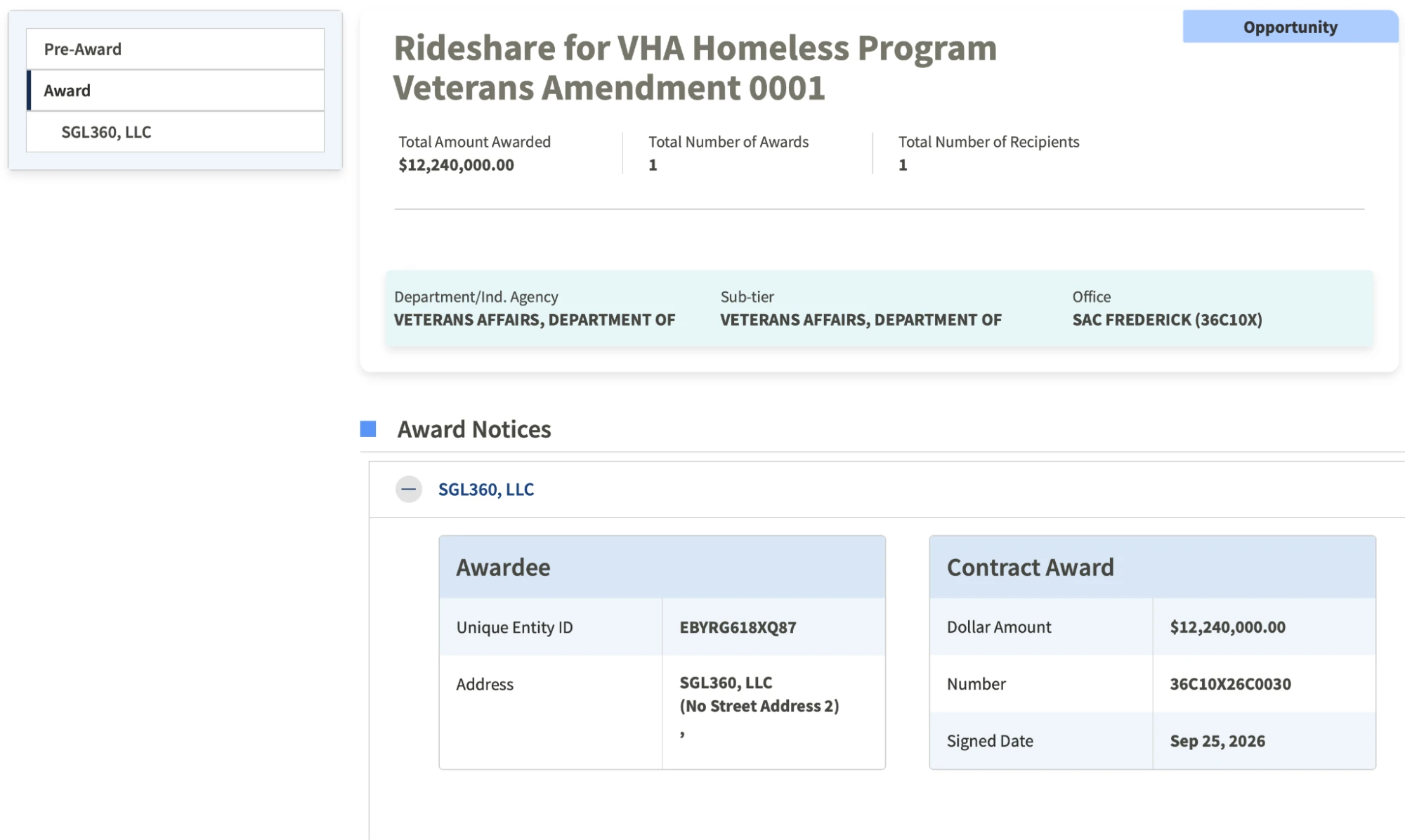 (opens full size in a new tab)
An opportunity can still be useful after bidding closes.
An award notice identifies the company that won the contract. That company is the prime contractor, and it may be a potential contact for subcontracting.
Remember the Notice ID or solicitation number you saved? Search for it again, include inactive opportunities, and look for related award information.
For example, this VA award record (opens in a new tab) identifies SGL360, LLC as the awardee. You can use the company name to research the business and find its public contact information.
An award does not mean the company needs subcontractors. It gives you a starting point to review the work and decide whether an introduction makes sense.
5. Getting ready to bid
If you find opportunities that match your business and want to pursue them, the next step is to register on SAM.gov (opens in a new tab).
Before registering, gather:
- Your legal business name and physical address.
- Taxpayer identification information.
- Banking details for electronic payments.
- Business contacts.
- NAICS codes that describe your services.
Use the SAM.gov entity registration checklist (opens in a new tab) to confirm the full requirements. Start well before a solicitation deadline so you have time to resolve validation or technical issues.
SAM.gov assigns your Unique Entity ID (UEI) during registration. If you already have one, check that your entity registration is active. Having a UEI alone does not mean registration is complete.
Prepare a capabilities statement
You’ll also want a capabilities statement: a short introduction that explains what your business does, where you operate, and why you can perform the work.
You can share it with contracting contacts and potential partners. Some notices will specifically request one.
Keep it concise—typically one page—and include:
- Your services, service area, and operating hours.
- Fleet information, including vehicle types and accessibility.
- Relevant experience and references.
- Business certifications and socioeconomic status.
- Your business name, contact information, website, and UEI once assigned.
- NAICS codes that describe your services.
Save your searches
Once you have a SAM.gov account, save relevant searches and enable email notifications. This helps you keep track of new notices that match your search criteria.
You can find instructions (opens in a new tab) on the SAM.gov Help page (opens in a new tab).
6. Explore other ways to work with the VA
If you’re not ready to bid, you can still learn about the work and introduce your business. Bidder sessions, prime contractors, and VA outreach events are places to start.
Attend bidder sessions
Some procurements include pre-bid or pre-proposal conferences. These sessions help prospective bidders understand the requirements and ask questions before submitting an offer.
Check the notice for dates, registration instructions, meeting format, and whether attendance is mandatory.
Where the format permits, introduce yourself to other attendees. A company pursuing the full contract may need a partner that serves your area or provides your type of transportation.
Contact a prime contractor
If you cannot perform the full contract, you may still be able to provide part of the service through subcontracting.
Use the award information discussed earlier to identify the prime contractor. Before reaching out, review the original scope and prepare a clear explanation of how your services could support the work.
Lead with the contract reference, counties you serve, operating hours, and trip types you can cover. Have your capabilities statement, fleet details, licensing, insurance, references, and certifications ready.
A first note could read:
I saw your VA award for [service or contract reference], congratulations. We provide [trip type] in [counties] and can cover [hours or specific service gap]. If you’re considering subcontractors for that area, I can send a one-page capabilities statement with our fleet, coverage, and insurance details. Who handles transportation partnerships for this contract?
If there is interest, confirm that the proposed arrangement meets the contract’s requirements and applicable subcontracting limits.
Network with the VA
VA facilities and outreach events can help you learn about purchasing needs and identify relevant contacts.
Use the VA facility locator (opens in a new tab) to find medical centers and clinics in your service area. Ask which contracting office handles transportation procurement and where it posts upcoming opportunities.
You can also check the VA outreach and events calendar (opens in a new tab) for relevant events. Bring a short description of your services, counties, vehicles, and hours so contacts can understand what you offer.
If a solicitation is already open, direct questions to the contact listed in the notice and follow its instructions.
7. Build a bid file you can reuse
As you research opportunities, keep a living document with your search terms, NAICS codes, certifications, Notice IDs, contacts, and lessons learned. This gives you a process to repeat instead of starting from scratch each time.
Keep commonly requested documents together, including:
- SAM registration details and UEI.
- Your capabilities statement.
- Insurance, licenses, and certifications.
- Fleet information.
- Service area and operating hours.
- Relevant experience and references.
For each opportunity, add a checklist with its deadlines, required documents, submission instructions, and amendments.
Requirements vary by facility, region, and contract. Your bid file gives you a starting point, but each notice should guide the response you submit.
Key takeaways
- You have several ways to pursue VA transportation work. You can bid directly, respond to Sources Sought notices, or explore partnerships with companies that already hold contracts.
- Start by learning the search terms and NAICS codes buyers use for your services. Read each notice carefully, confirm your eligibility, and prepare the information needed to show what your business can provide.
- Keep track of relevant opportunities even when you cannot bid. What you learn—and the contacts you make—can help you prepare for the next one.
How Move AI can support
As you explore opportunities with the VA, consider how your fleet would manage the additional work alongside existing trips. Move AI’s route optimization and fleet management platform can help you optimize routes, match trips to suitable vehicles and drivers, and adjust schedules as the day changes. For transportation providers looking to expand into VA work, this means a clearer view of available capacity and the support to take on new work while maintaining reliable service.